We can use a ClassLoader object to dynamically load a class into the execution of our code. Trying to load the very same class one more time won’t reload it unless we do it using a new ClassLoader object. We can use this technique for reloading a new modified class during the execution of our code.
In order to ensure the loading of the class isn’t performed by some parent class loader make sure to place the java byte code file of the loaded class within a folder that is not on the classpath.
The following code sample shows that.
The first file is the application itself. You should execute it within a separated command line window.
import java.io.*;
import java.net.*;
public class Sample
{
public static void main(String args[]) throws Exception
{
File folder = new File(System.getProperty(“user.dir”)+File.separator+”files”+File.separator);
URL[] vec = {folder.toURI().toURL()};
for(int i=0; i<10; i++)
{
System.out.println(“…”);
ClassLoader loader = new URLClassLoader(vec);
Class ob = loader.loadClass(“Box”);
Object box = ob.newInstance();
System.out.println(box);
Thread.sleep(20000);
}
}
}
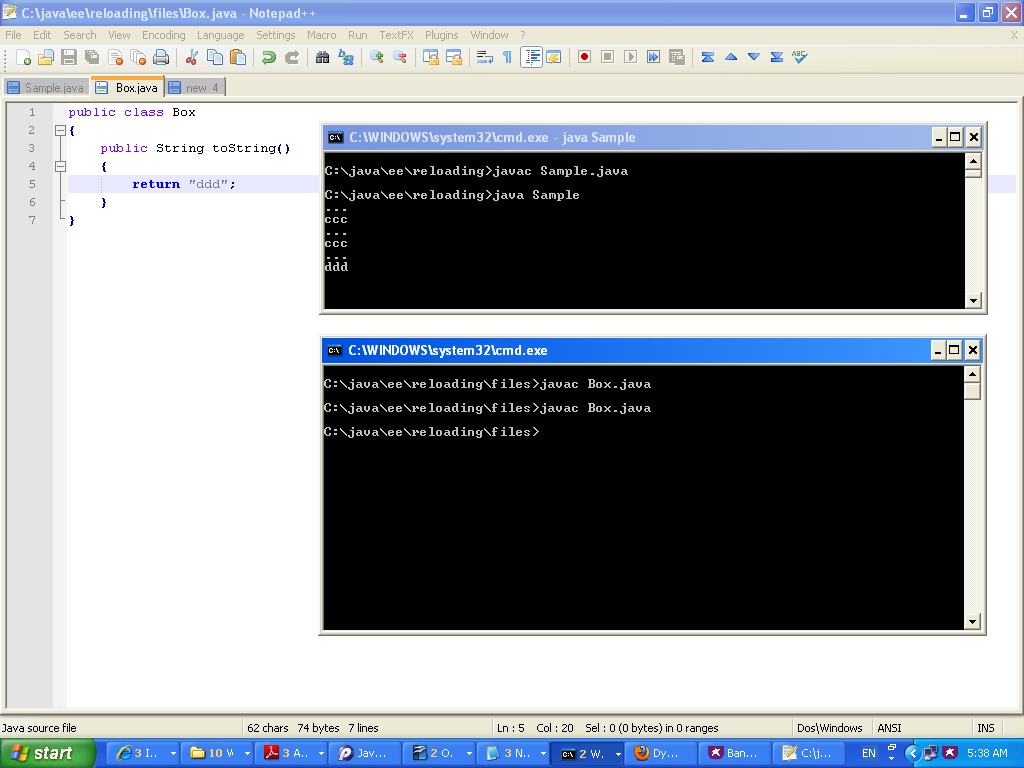
The second file is the definition for Box.java. You should make sure the java byte code file resulted from compiling this class is saved within a separated folder, so that it will be loaded using our class loader.
public class Box
{
public String toString()
{
return “ddd”;
}
}
The following is the output we get when running the application in one command line window and compiling the new source code of the class Box within another separated one.